
How to Add Admins to Your Enshrouded Server
Updated October 27, 2026
In Enshrouded, admin access is managed through a dedicated admin password. Players who join the server using this password receive elevated permissions, allowing them to manage the server from within the game.
Accessing Server Settings
The admin password is configured through your server's config file, accessible from the control panel.
- Log into your server control panel and Stop the server.
- Open the
Server Configtab. - Find the
Admin Group Passwordsetting.
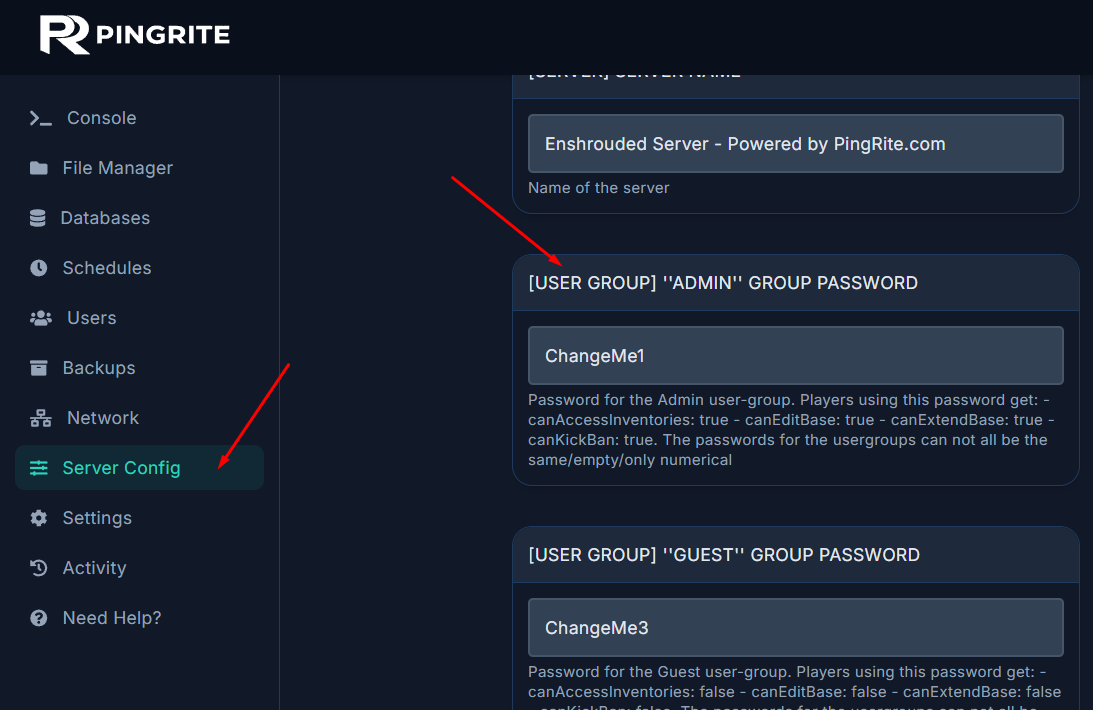
Setting Your Admin Password
- Replace the Admin Group Password with a password of your choice.
- Save your changes.
- Start the server to apply the new configuration.
Joining as an Admin In-Game
After configuring the admin password and starting the server:
- Launch Enshrouded.
- When connecting to your server, use the Admin Password.
- You'll join with admin privileges, giving you access to elevated server controls.
Notes
- Only players who connect with the Admin Password will have administrative access.
- Admin permissions currently grant elevated privileges, with additional server management features expected in future Enshrouded updates.
For a more detailed guide on server configuration, see How to Configure Your Enshrouded Server.